


Challenge: Excel (Forensics)
Description: Given a WorkBook.xlsx file:
🏁 Flag format: RPCACTF{md5}
Tools Used
- Excel
- binwalk
Step 1: Open the file in Excel Online
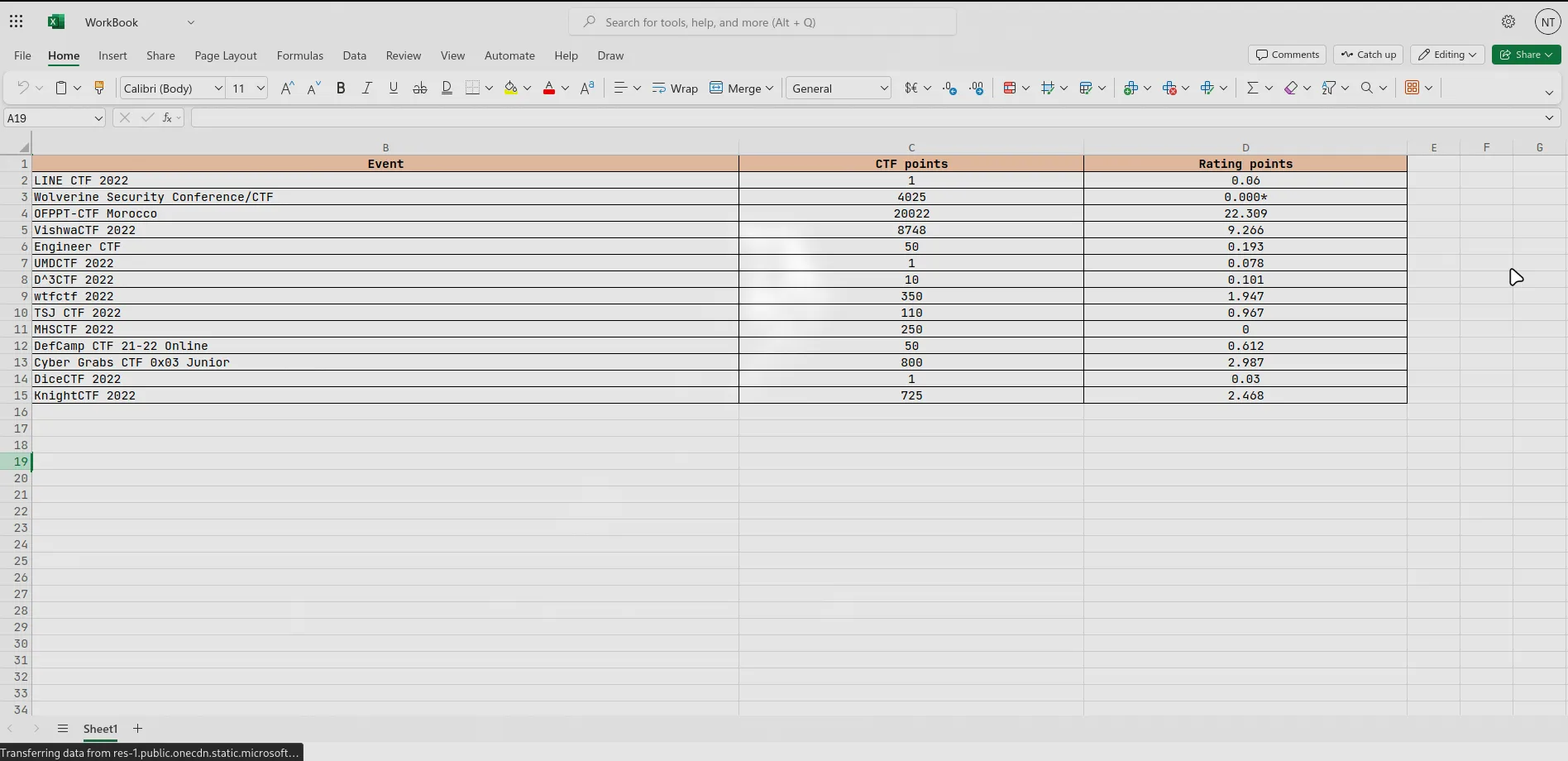
I started off by opening the file in Excel Online just to see if the flag was hiding in any cells, sheets, or maybe as a comment or formula. But nah, Everything looked clean.
Step 2: Extract the file using binwalk -e
Since .xlsx files are basically zip archives, I used binwalk to extract its contents:
┌──(kali㉿kali)-[~/Downloads]└─$ binwalk -e WorkBook.xlsx
DECIMAL       HEXADECIMAL     DESCRIPTION--------------------------------------------------------------------------------0             0x0             Zip archive data, at least v2.0 to extract, compressed size: 366, uncompressed size: 1284, name: [Content_Types].xml935           0x3A7           Zip archive data, at least v2.0 to extract, compressed size: 244, uncompressed size: 588, name: _rels/.rels1740          0x6CC           Zip archive data, at least v2.0 to extract, compressed size: 877, uncompressed size: 2191, name: xl/workbook.xml2662          0xA66           Zip archive data, at least v2.0 to extract, compressed size: 243, uncompressed size: 698, name: xl/_rels/workbook.xml.rels3225          0xC99           Zip archive data, at least v2.0 to extract, compressed size: 1168, uncompressed size: 4052, name: xl/worksheets/sheet1.xml4447          0x115F          Zip archive data, at least v2.0 to extract, compressed size: 1870, uncompressed size: 8390, name: xl/theme/theme1.xml6366          0x18DE          Zip archive data, at least v2.0 to extract, compressed size: 868, uncompressed size: 2448, name: xl/styles.xml7277          0x1C6D          Zip archive data, at least v2.0 to extract, compressed size: 337, uncompressed size: 727, name: xl/sharedStrings.xml7664          0x1DF0          Zip archive data, at least v2.0 to extract, compressed size: 193, uncompressed size: 322, name: xl/worksheets/_rels/sheet1.xml.rels7922          0x1EF2          Zip archive data, at least v2.0 to extract, compressed size: 450, uncompressed size: 5420, name: xl/printerSettings/printerSettings1.bin8441          0x20F9          Zip archive data, at least v2.0 to extract, compressed size: 357, uncompressed size: 639, name: docProps/core.xml9109          0x2395          Zip archive data, at least v2.0 to extract, compressed size: 393, uncompressed size: 785, name: docProps/app.xml
WARNING: One or more files failed to extract: either no utility was found or it's unimplemented
Step 3: Look inside docProps/core.xml
I navigated into the extracted directory and went straight into docProps, which usually holds metadata info:
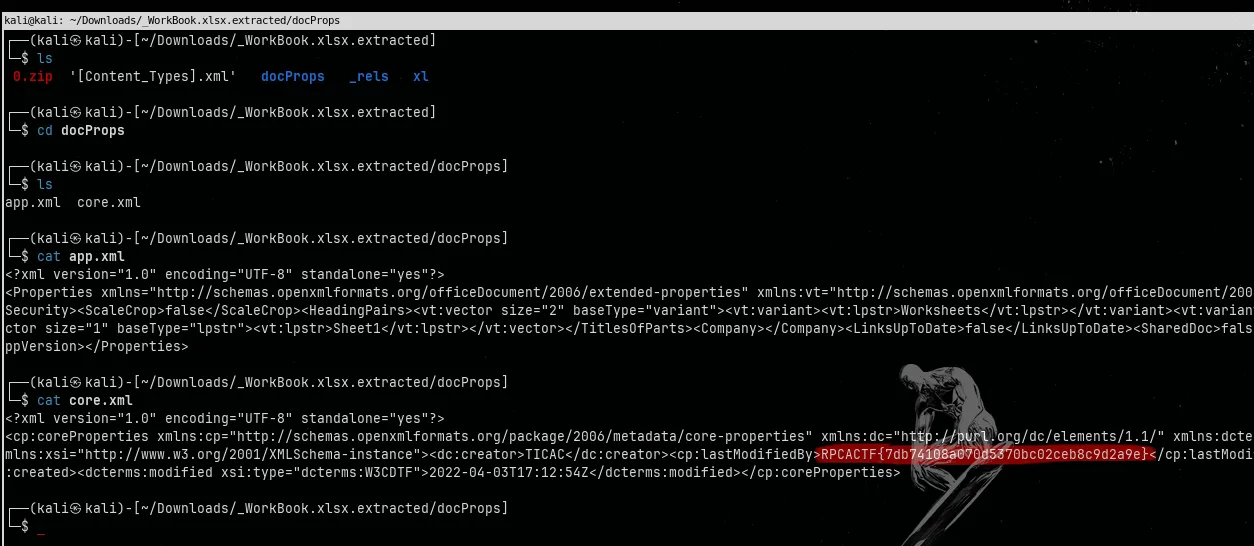
🏁 Flag
RPCACTF{7db74108a070d5370bc02ceb8c9d2a9e}Challenge: Power Point (Forensics)
Description: Given a Presentation.pptx file:
🏁 Flag format: RPCACTF{md5}
Tools Used
- Power Point
- binwalk
- Tesseract OCR
Step 1: Open the file in PowerPoint Online
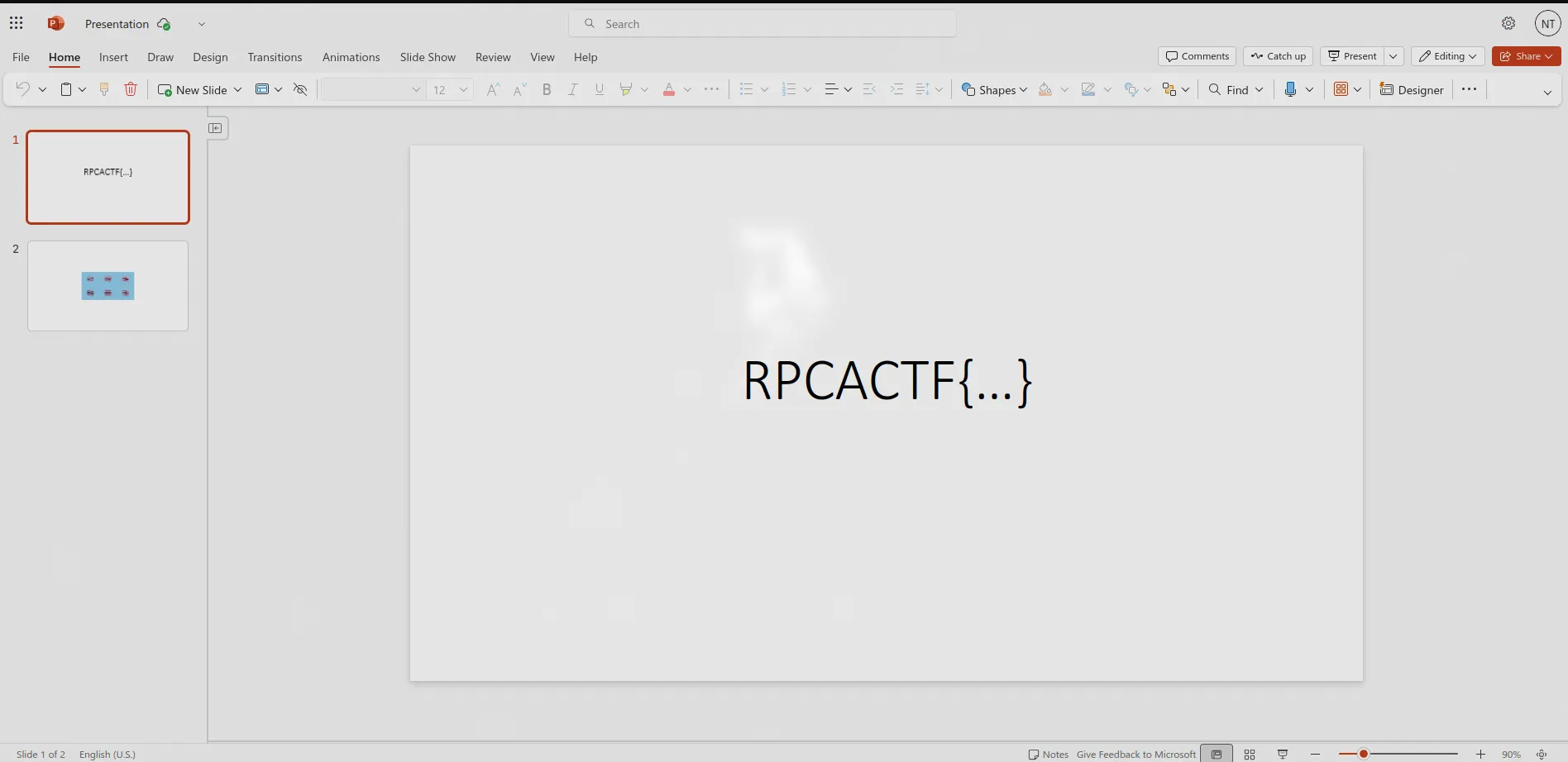
I started by uploading and opening the file in PowerPoint Online to see if the flag was just sitting on a slide somewhere.
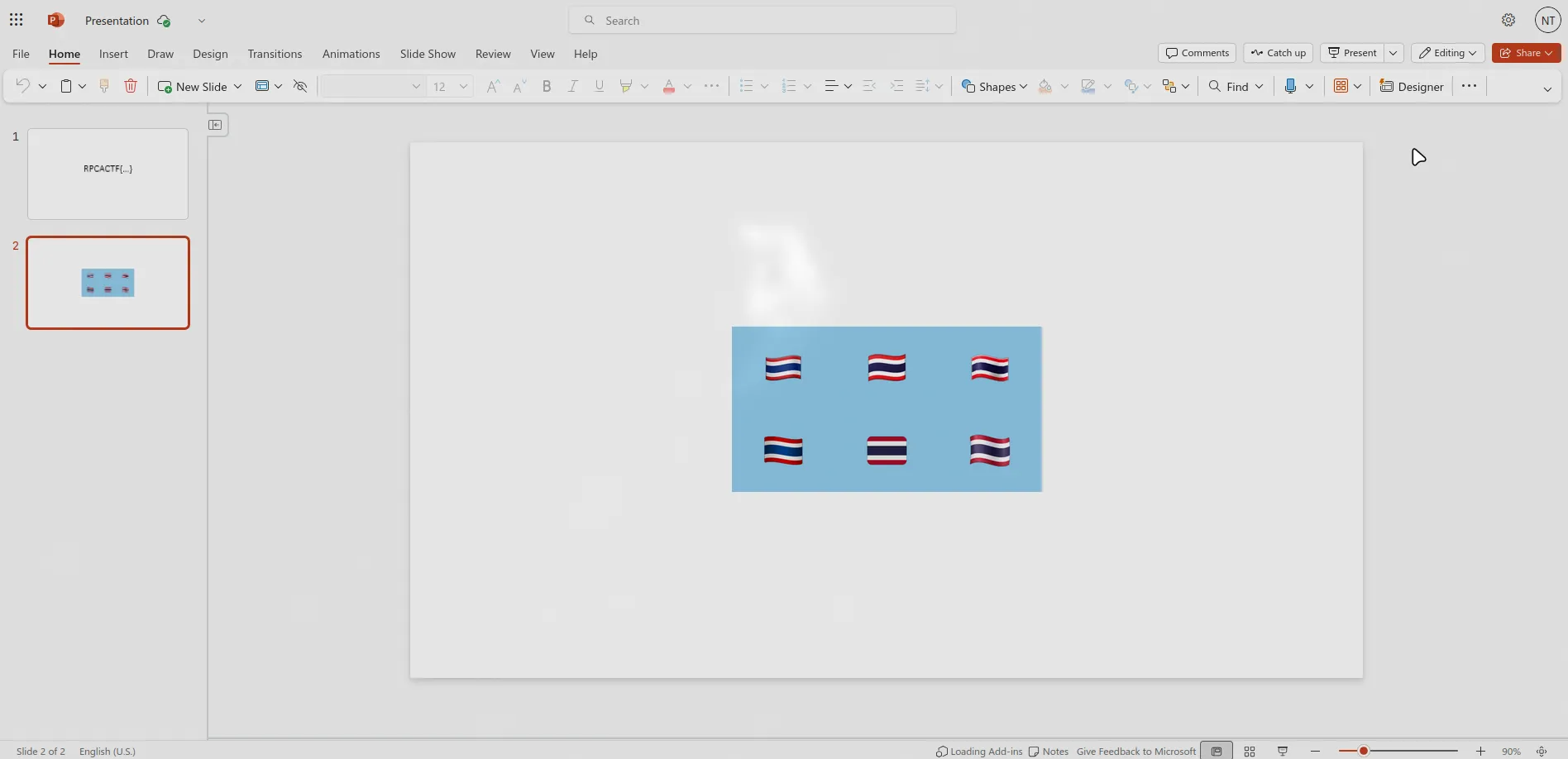
There was only one image visible in the presentation. Looked pretty normal no hidden text or weird formatting.
Step 2: Extract the file using binwalk -e
Next up, I ran binwalk to unpack the .pptx archive:
┌──(kali㉿kali)-[~/Downloads]└─$ binwalk -e Presentation.pptx
DECIMAL       HEXADECIMAL     DESCRIPTION--------------------------------------------------------------------------------0             0x0             Zip archive data, at least v2.0 to extract, compressed size: 443, uncompressed size: 3322, name: [Content_Types].xml528           0x210           Zip archive data, at least v2.0 to extract, compressed size: 259, uncompressed size: 738, name: _rels/.rels864           0x360           Zip archive data, at least v2.0 to extract, compressed size: 275, uncompressed size: 1109, name: ppt/_rels/presentation.xml.rels1236          0x4D4           Zip archive data, at least v2.0 to extract, compressed size: 621, uncompressed size: 1255, name: ppt/slides/slide1.xml1944          0x798           Zip archive data, at least v2.0 to extract, compressed size: 643, uncompressed size: 1344, name: ppt/slides/slide2.xml2674          0xA72           Zip archive data, at least v2.0 to extract, compressed size: 192, uncompressed size: 311, name: ppt/slides/_rels/slide1.xml.rels2964          0xB94           Zip archive data, at least v2.0 to extract, compressed size: 214, uncompressed size: 446, name: ppt/slides/_rels/slide2.xml.rels3276          0xCCC           Zip archive data, at least v2.0 to extract, compressed size: 661, uncompressed size: 3411, name: ppt/presentation.xml4023          0xFB7           Zip archive data, at least v2.0 to extract, compressed size: 2062, uncompressed size: 13875, name: ppt/slideMasters/slideMaster1.xml6184          0x1828          Zip archive data, at least v2.0 to extract, compressed size: 1279, uncompressed size: 4677, name: ppt/slideLayouts/slideLayout1.xml7562          0x1D8A          Zip archive data, at least v2.0 to extract, compressed size: 1098, uncompressed size: 3919, name: ppt/slideLayouts/slideLayout2.xml8759          0x2237          Zip archive data, at least v2.0 to extract, compressed size: 1337, uncompressed size: 5441, name: ppt/slideLayouts/slideLayout3.xml10195         0x27D3          Zip archive data, at least v2.0 to extract, compressed size: 1198, uncompressed size: 4974, name: ppt/slideLayouts/slideLayout4.xml11492         0x2CE4          Zip archive data, at least v2.0 to extract, compressed size: 1553, uncompressed size: 7937, name: ppt/slideLayouts/slideLayout5.xml13144         0x3358          Zip archive data, at least v2.0 to extract, compressed size: 981, uncompressed size: 3063, name: ppt/slideLayouts/slideLayout6.xml14224         0x3790          Zip archive data, at least v2.0 to extract, compressed size: 902, uncompressed size: 2548, name: ppt/slideLayouts/slideLayout7.xml15225         0x3B79          Zip archive data, at least v2.0 to extract, compressed size: 1450, uncompressed size: 5950, name: ppt/slideLayouts/slideLayout8.xml16774         0x4186          Zip archive data, at least v2.0 to extract, compressed size: 1405, uncompressed size: 5898, name: ppt/slideLayouts/slideLayout9.xml18278         0x4766          Zip archive data, at least v2.0 to extract, compressed size: 1129, uncompressed size: 3975, name: ppt/slideLayouts/slideLayout10.xml19507         0x4C33          Zip archive data, at least v2.0 to extract, compressed size: 1183, uncompressed size: 4199, name: ppt/slideLayouts/slideLayout11.xml20790         0x5136          Zip archive data, at least v2.0 to extract, compressed size: 277, uncompressed size: 1991, name: ppt/slideMasters/_rels/slideMaster1.xml.rels21177         0x52B9          Zip archive data, at least v2.0 to extract, compressed size: 188, uncompressed size: 311, name: ppt/slideLayouts/_rels/slideLayout1.xml.rels21475         0x53E3          Zip archive data, at least v2.0 to extract, compressed size: 188, uncompressed size: 311, name: ppt/slideLayouts/_rels/slideLayout2.xml.rels21773         0x550D          Zip archive data, at least v2.0 to extract, compressed size: 188, uncompressed size: 311, name: ppt/slideLayouts/_rels/slideLayout3.xml.rels22071         0x5637          Zip archive data, at least v2.0 to extract, compressed size: 188, uncompressed size: 311, name: ppt/slideLayouts/_rels/slideLayout4.xml.rels22369         0x5761          Zip archive data, at least v2.0 to extract, compressed size: 188, uncompressed size: 311, name: ppt/slideLayouts/_rels/slideLayout5.xml.rels22667         0x588B          Zip archive data, at least v2.0 to extract, compressed size: 188, uncompressed size: 311, name: ppt/slideLayouts/_rels/slideLayout6.xml.rels22965         0x59B5          Zip archive data, at least v2.0 to extract, compressed size: 188, uncompressed size: 311, name: ppt/slideLayouts/_rels/slideLayout7.xml.rels23263         0x5ADF          Zip archive data, at least v2.0 to extract, compressed size: 188, uncompressed size: 311, name: ppt/slideLayouts/_rels/slideLayout8.xml.rels23561         0x5C09          Zip archive data, at least v2.0 to extract, compressed size: 188, uncompressed size: 311, name: ppt/slideLayouts/_rels/slideLayout9.xml.rels23859         0x5D33          Zip archive data, at least v2.0 to extract, compressed size: 188, uncompressed size: 311, name: ppt/slideLayouts/_rels/slideLayout10.xml.rels24158         0x5E5E          Zip archive data, at least v2.0 to extract, compressed size: 188, uncompressed size: 311, name: ppt/slideLayouts/_rels/slideLayout11.xml.rels24457         0x5F89          Zip archive data, at least v2.0 to extract, compressed size: 1732, uncompressed size: 8399, name: ppt/theme/theme1.xml26275         0x66A3          Zip archive data, at least v2.0 to extract, compressed size: 2080, uncompressed size: 2080, name: docProps/thumbnail.jpeg28444         0x6F1C          Zip archive data, at least v2.0 to extract, compressed size: 29296, uncompressed size: 29296, name: ppt/media/image1.png57826         0xE1E2          Zip archive data, at least v2.0 to extract, compressed size: 397, uncompressed size: 818, name: ppt/presProps.xml58306         0xE3C2          Zip archive data, at least v2.0 to extract, compressed size: 362, uncompressed size: 770, name: ppt/viewProps.xml58751         0xE57F          Zip archive data, at least v2.0 to extract, compressed size: 172, uncompressed size: 182, name: ppt/tableStyles.xml59008         0xE680          Zip archive data, at least v2.0 to extract, compressed size: 356, uncompressed size: 682, name: docProps/core.xml59447         0xE837          Zip archive data, at least v2.0 to extract, compressed size: 540, uncompressed size: 1332, name: docProps/app.xml60069         0xEAA5          Zip archive data, at least v2.0 to extract, compressed size: 13432, uncompressed size: 23698, name: ppt/media/image2.jpg
WARNING: One or more files failed to extract: either no utility was found or it's unimplemented
Step 3: Check the media folder
I cd into the media folder:
cd _Presentation.pptx.extracted/ppt/media
There were two images in there but only one showed up in PowerPoint Online. So clearly something was being hidden.
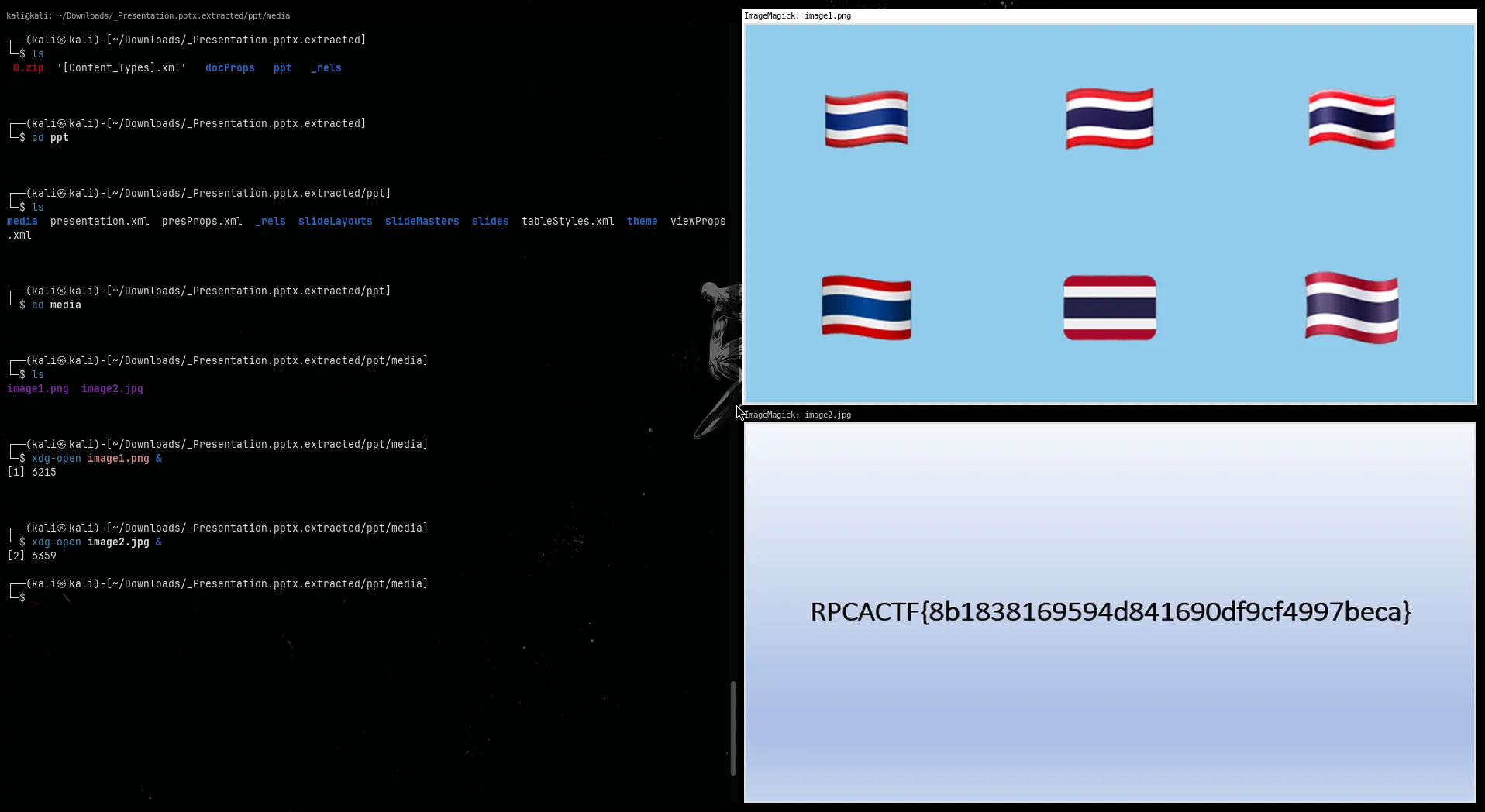
Step 4: Extract text from the second image
I opened both images. One of them looked normal, the other had some weird text embedded in it like it was meant to be hidden in plain sight.
To extract the text, I used tesseract (OCR):
┌──(kali㉿kali)-[~/Downloads/_Presentation.pptx.extracted/ppt/media]└─$ tesseract image2.jpg stdoutRPCACTF{8b1838169594d841690df9cf4997beca}🏁 Flag
RPCACTF{8b1838169594d841690df9cf4997beca}Challenge: Find The Flag (Forensics)
Description: Given a finding_the_flag.jpg file:
🏁 Flag format: RPCACTF{md5}
Tools Used
- Strings
Step 1: Run strings on the image
Since it’s a basic .jpg file, I just ran strings to see if there was any readable text embedded directly in the binary. Sure enough, it was right there:
┌──(kali㉿kali)-[~/Downloads]└─$ strings finding_the_flag.jpg | grep RPCA RPCACTF{b37672799fb18e4fb4dbe14c0761df95}🏁 Flag
RPCACTF{b37672799fb18e4fb4dbe14c0761df95}Challenge: The Shark (Networking)
Description: Given a the_shark.pcapng file:
🏁 Flag format: RPCACTF{md5}
Tools Used
- WireShark
- Python
Step 1: Open the PCAP in Wireshark
I opened the file in Wireshark and started by searching for common keywords like flag, GET, and .jpg.
Eventually, I spotted several HTTP GET requests for filenames like:
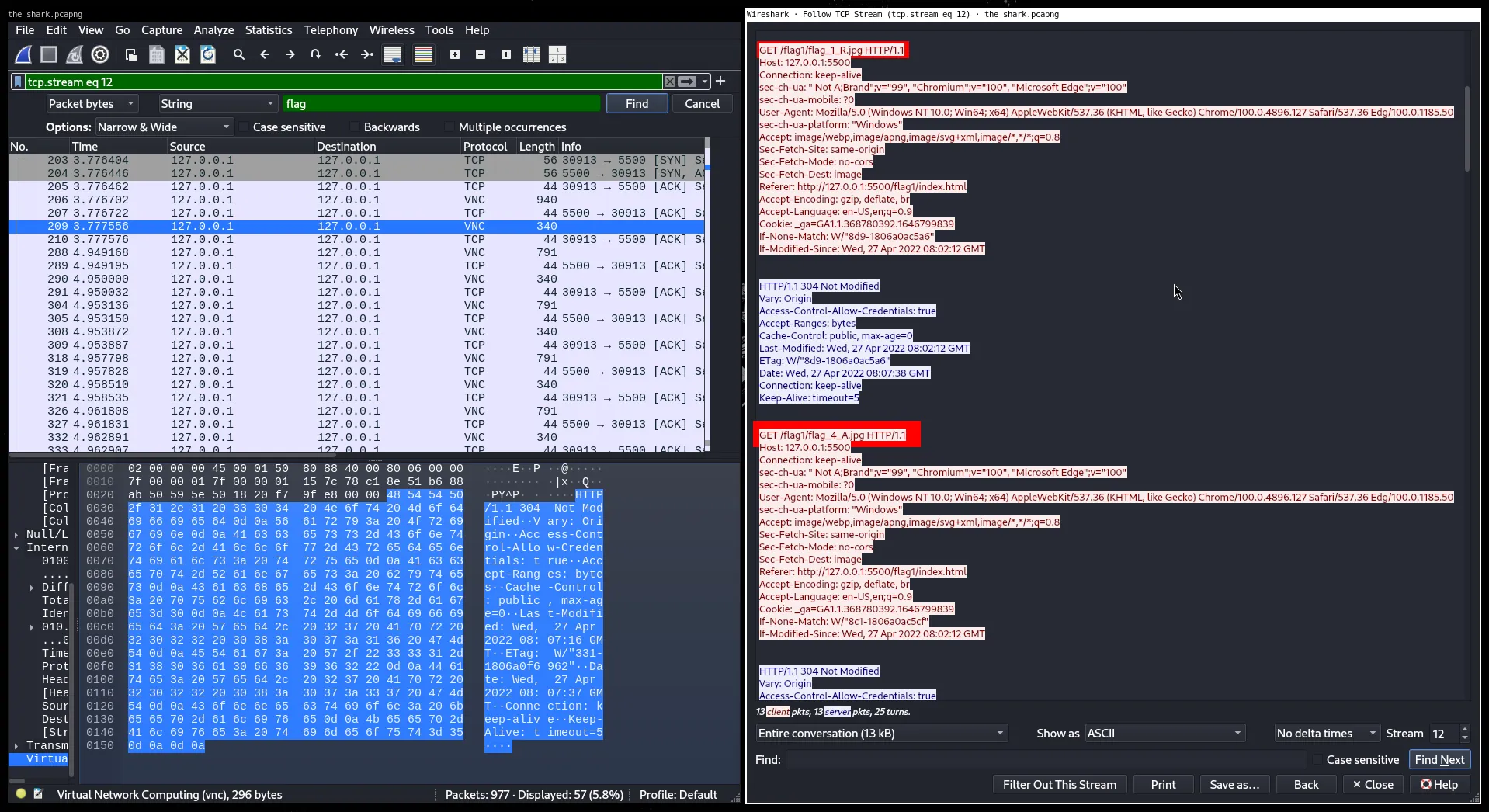
Looks like the filenames were hiding letters of the flag, and the number after flag_ indicated the letter’s position.
Step 2: Reconstruct the Flag using Python
Instead of manually going through all the GET requests, I wrote a quick Python script using Scapy to automate it:
from scapy.all import rdpcap, Rawfrom urllib.parse import unquoteimport re
pcap = rdpcap("the_shark.pcapng")flags = []
for pkt in pcap: if pkt.haslayer(Raw): data = unquote(pkt[Raw].load.decode(errors="ignore")) match = re.search(r'GET\s+/.*flag_(\d+)_([^/]+)\.jpg', data) if match: flags.append((int(match[1]), match[2]))
print("".join(val for _, val in sorted(flags)))This script sorted the pieces based on their index and combined them into a string.
Step 3: Final Output
Running the script gave this:
RPCACTF{b5b30141a5c004408bda5a22fad7f85b}undefinedundefinedLooks like there were a couple of malformed or extra requests, so I just cleaned up the undefined at the end.
Final flag:
RPCACTF{b5b30141a5c004408bda5a22fad7f85b}🏁 Flag
RPCACTF{b5b30141a5c004408bda5a22fad7f85b}Challenge: Pee Cab (Networking)
Description: Given a pee_cab.pcap file:
🏁 Flag format: RPCACTF{md5}
Tools Used
- WireShark
- Cyberchef
Step 1: Inspect HTTP objects in Wireshark
I opened the .pcap in Wireshark and went to File > Export Objects > HTTP
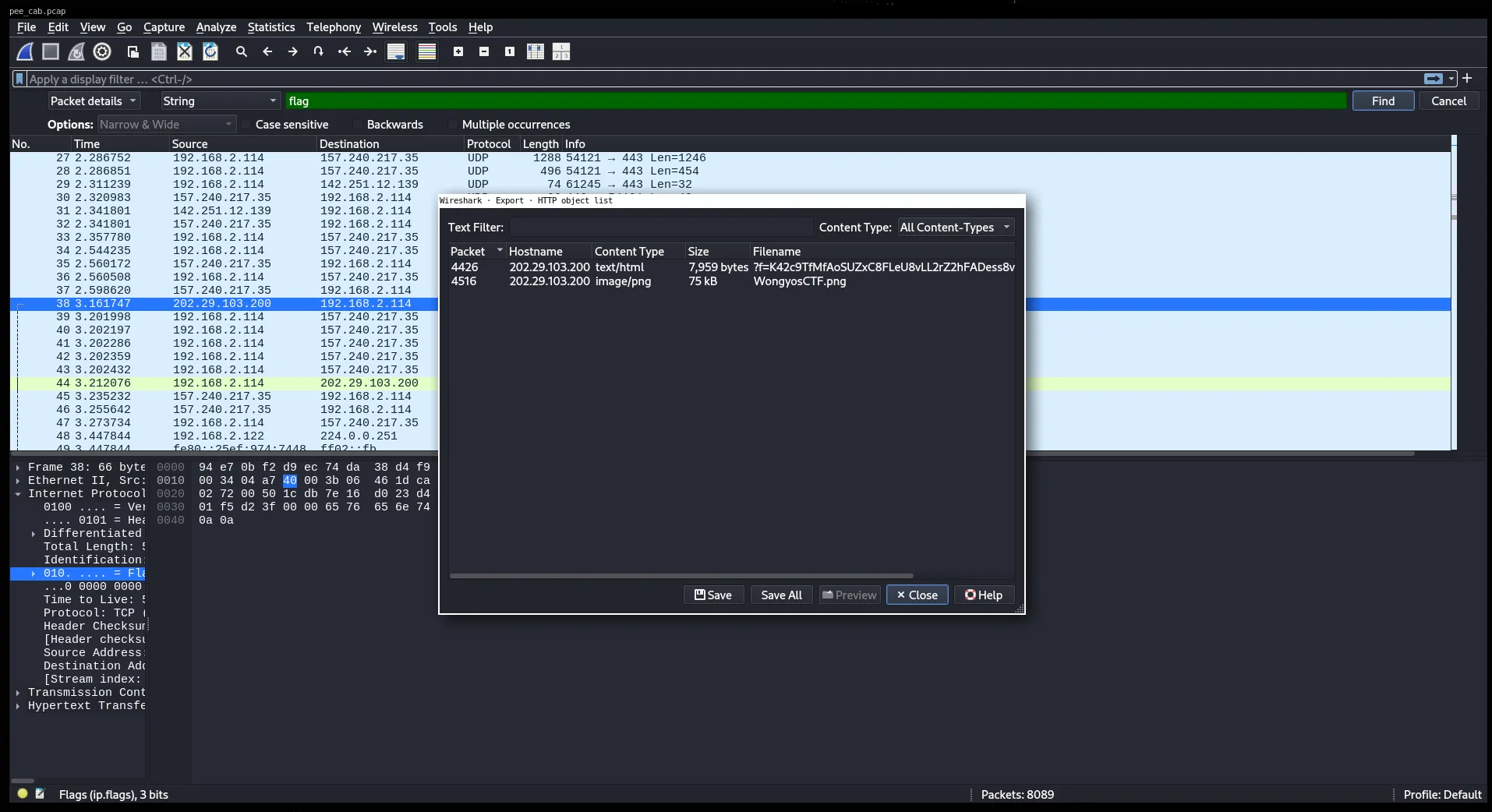
There were two files listed:
WongyosCTF.png just a banner image
Another file that looked like encrypted text or garbageSo I saved both to dig deeper.
Step 2: Analyze the suspicious file
The second file looked like this:
%3ff=K42c9TfMfAoSUZxC8FLeU8vLL2rZ2hFADess8visZYt7Hms49bEuCFqEI pasted that into CyberChef, and it looked like it was URL-encoded.
Step 3: Clean and decode
After decoding the URL string, I got this:
?f=K42c9TfMfAoSUZxC8FLeU8vLL2rZ2hFADess8visZYt7Hms49bEuCFqEThe I Clean the string The file started with ?f=, which looked like a parameter, so I removed it. Cleaned string:
K42c9TfMfAoSUZxC8FLeU8vLL2rZ2hFADess8visZYt7Hms49bEuCFqEStep 4: Decode using Base58
At first I assumed it was Base64 and tried that in CyberChef but it didn’t decode properly. After trying different encodings, I realized it’s actually Base58.
So in CyberChef, I used From Base58, and that gave me:
RPCACTF{1f34bf79cdb726d11d06fa1b06176562}🏁 Flag
RPCACTF{1f34bf79cdb726d11d06fa1b06176562}Challenge: Easy Packet Analyst (Networking)
Description: Given a Packet.pcapng file:
🏁 Flag format: RPCACTF{md5}
Tools Used
- WireShark
- MD5 Hash Generator
Step 1: Export HTTP Objects in Wireshark
Opened the .pcap file in Wireshark, then went to:
File > Export Objects > HTTPThere was a file called flag.png.
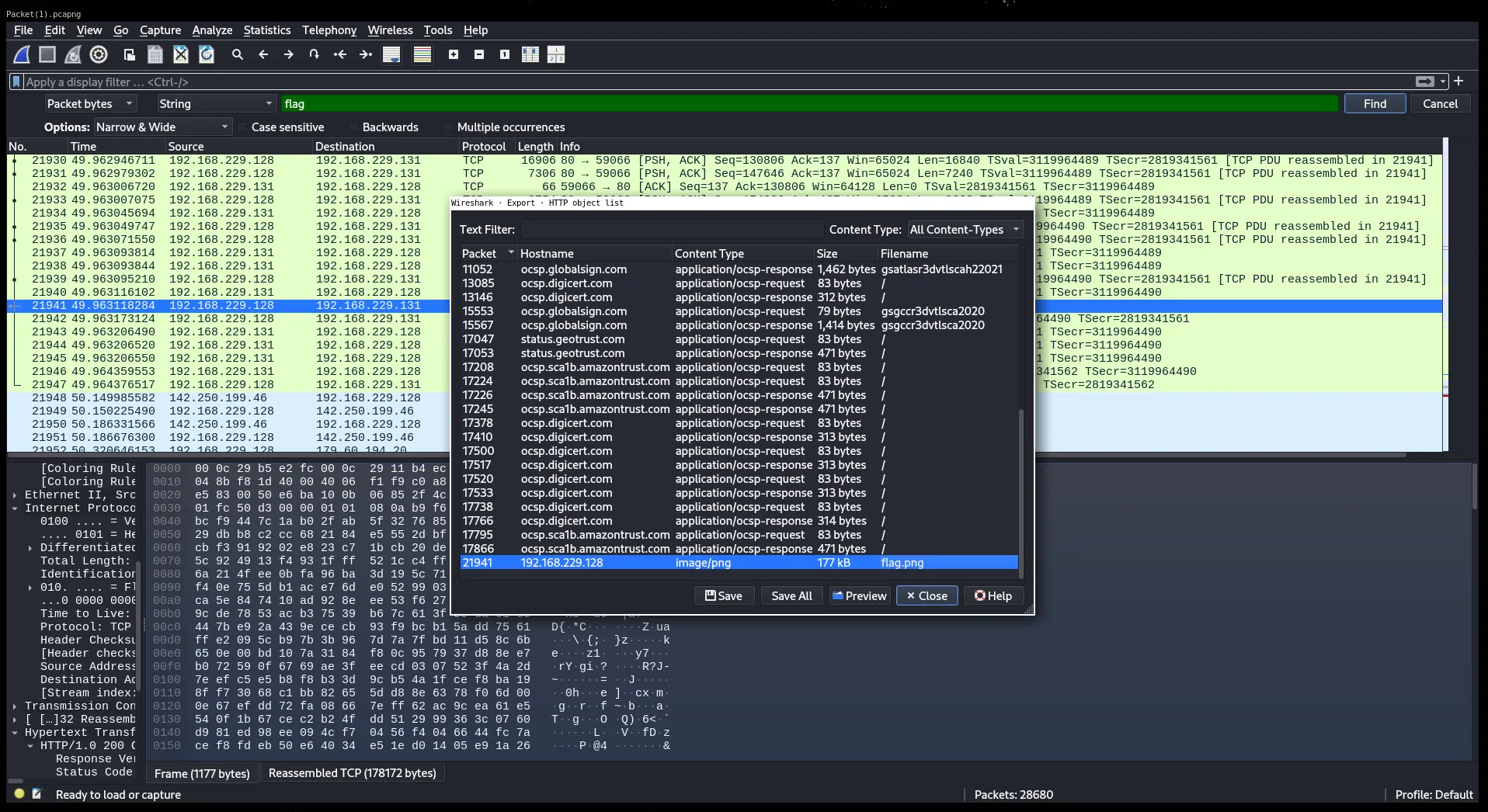
Step 2: Download and View the Image
Downloaded flag.png and opened it. The image had text saying:
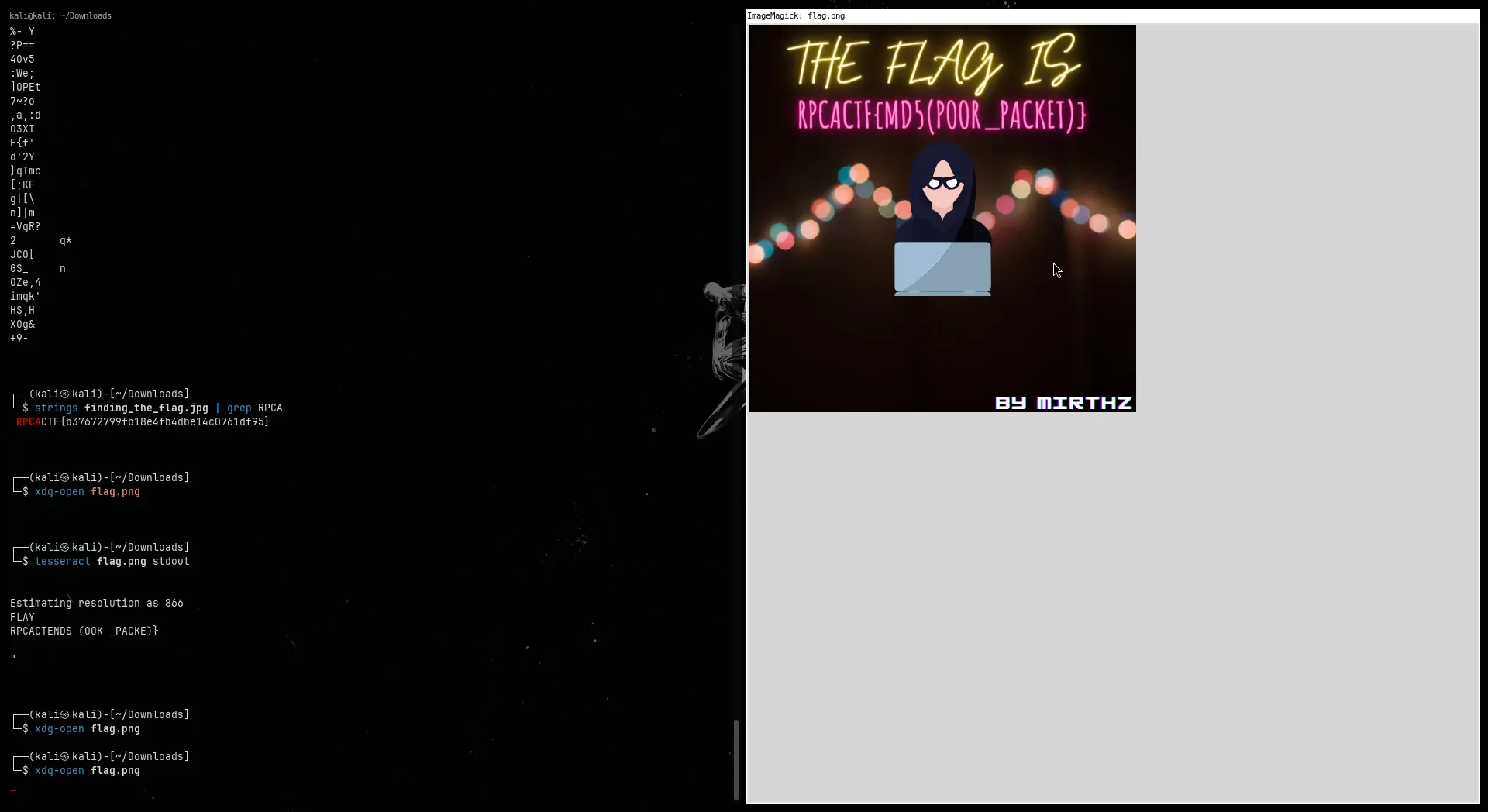
THE FLAG IS RPCACTF{md5(POOR_PACKET)}Step 3: Generate the MD5 Hash
Used an online MD5 generator and hashed the string:
POOR_PACKETThe MD5 output was:
facd91dd288e6702a61a1393a1047c84Step 4: Construct the Flag
Putting the hash in the flag format:
RPCACTF{facd91dd288e6702a61a1393a1047c84}🏁 Flag
RPCACTF{facd91dd288e6702a61a1393a1047c84}Challenge: Goto Pcap (Networking)
Description: Given a network.pcap file:
🏁 Flag format: RPCACTF{md5}
Tools Used
- WireShark
- Cyberchef
Step 1: Search for suspicious HTTP requests
I opened the .pcap in Wireshark and started checking HTTP traffic. Searched for common stuff like flag and found this request:
GET /flag.htmlSo I followed that HTTP stream.
Step 2: Found a weird-looking string
Scrolling through the HTTP response from /flag.html, I saw a string that looked like a flag but wasn’t quite readable:
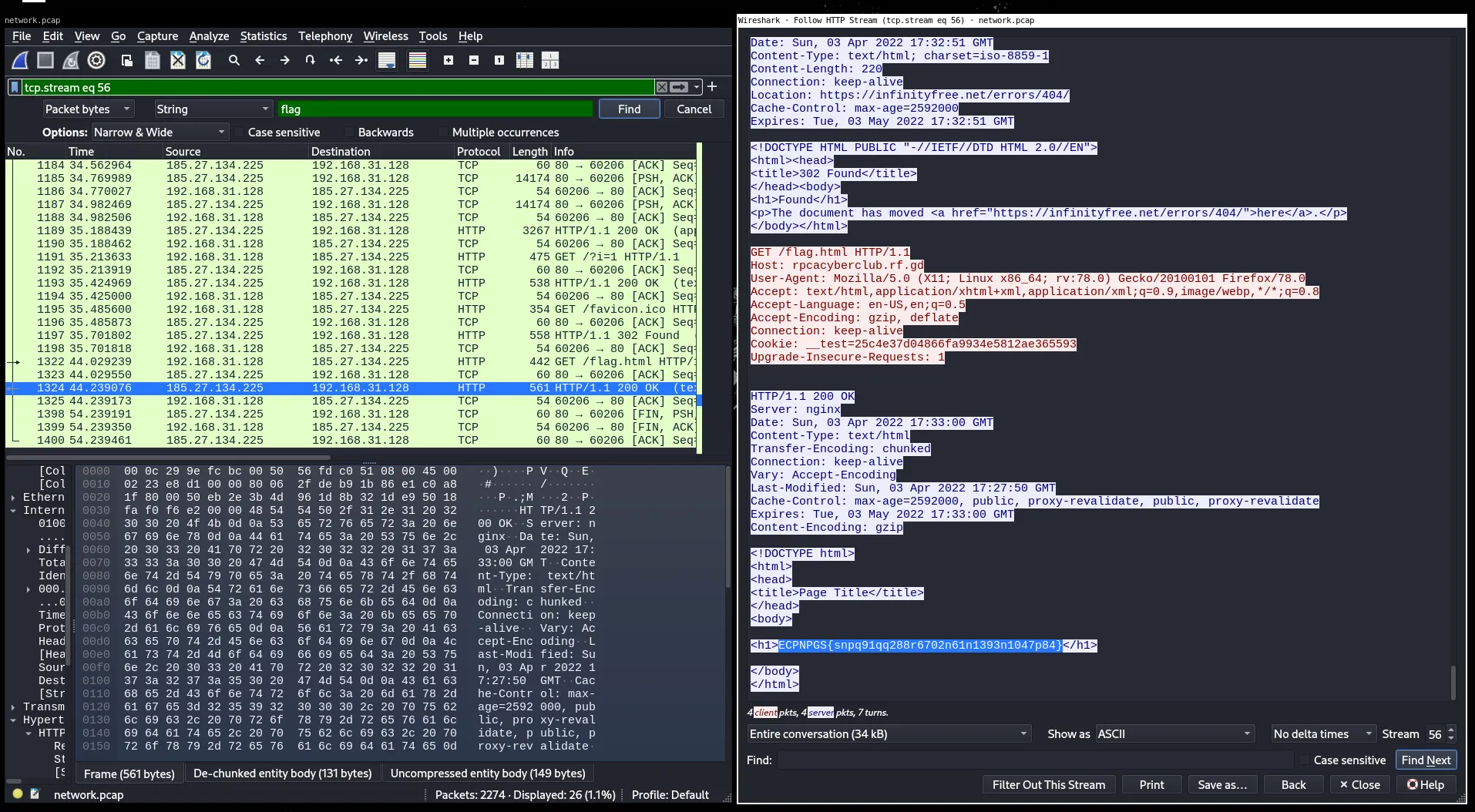
It looked like some kind of simple substitution cipher.
Step 3: ROT13 Decryption
I popped that string into CyberChef and used ROT13, since the letters looked like they were shifted.
Output:
RPCACTF{8338d66deffe6d188437e6dc9555d976}🏁 Flag
RPCACTF{8338d66deffe6d188437e6dc9555d976}Challenge: Bad App (Reverse Engineering)
Description: Given a bad-app.apk file:
🏁 Flag format: RPCACTF{md5}
Tools Used
- Decompiler
- Cyberchef
Step 1: Decompile the APK
I opened the .apk file using a decompiler. Browsed through the source code and found something suspicious in the Java code an array of numbers that looked like ASCII values.
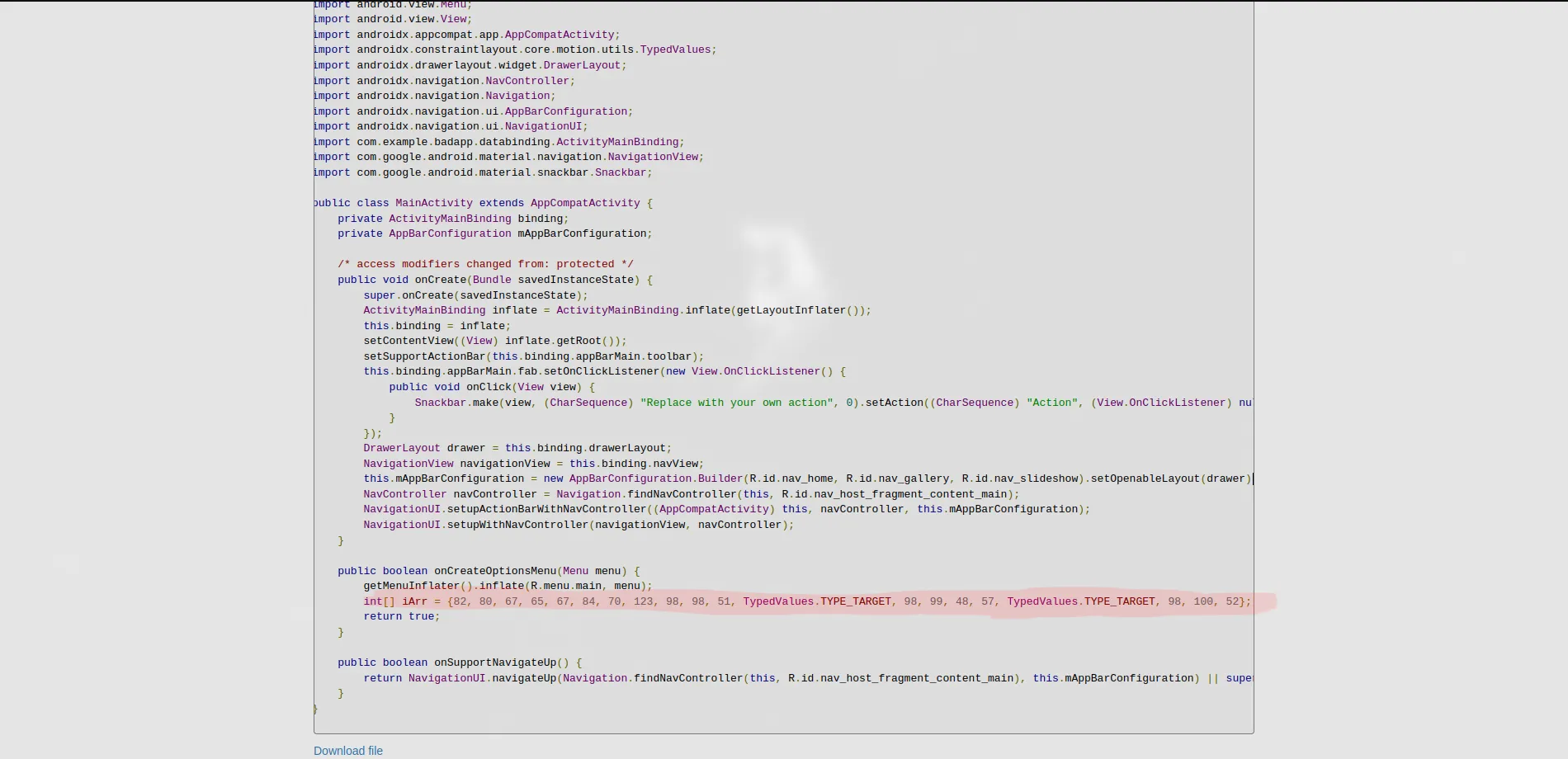
Step 2: Found ASCII Values and Convert to String
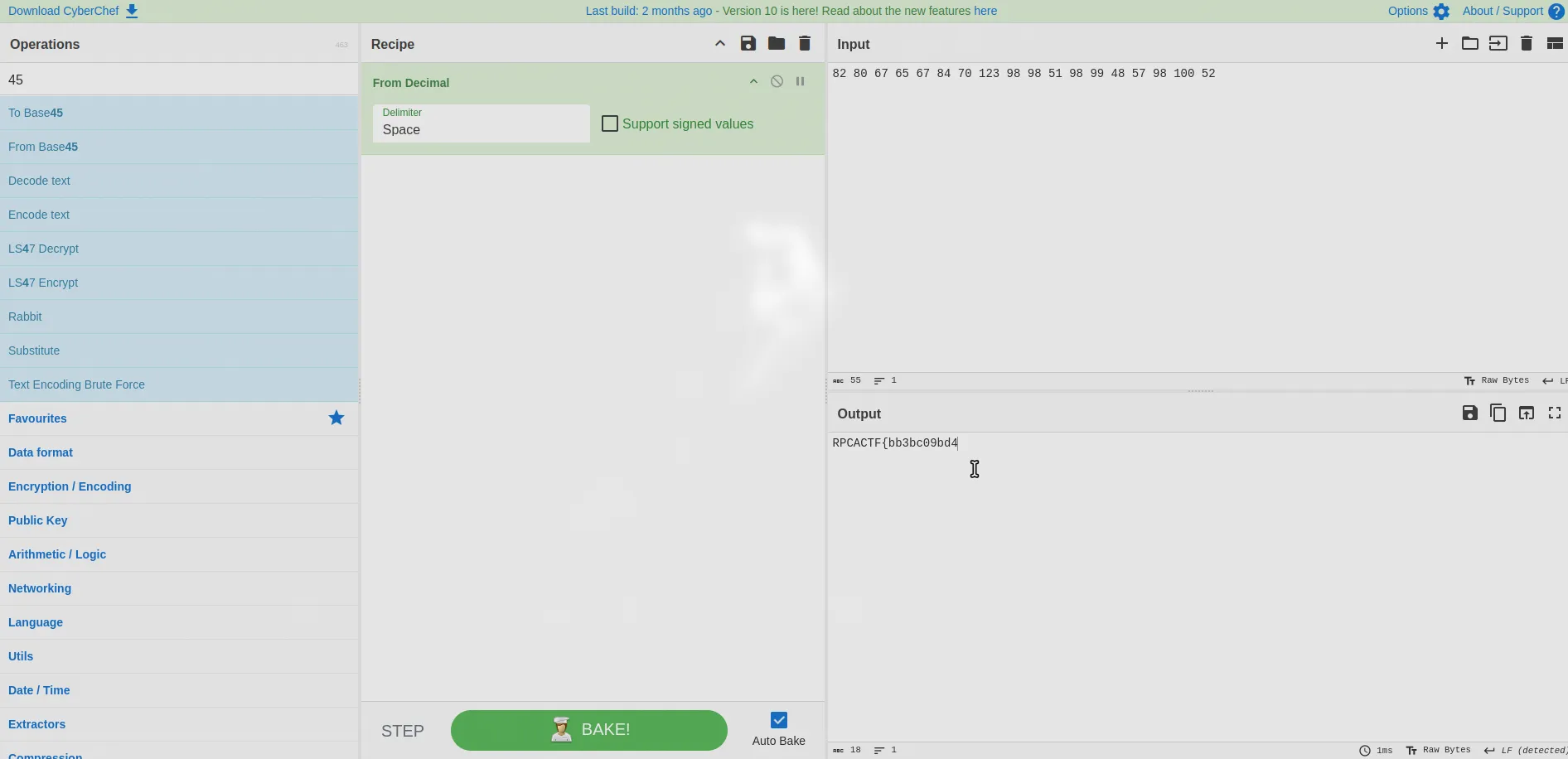
82 80 67 65 67 84 70 123 98 98 51 98 99 48 57 98 100 52RPCACTF{bb3bc09bd4............forgot to finish the full flag in the writeup lol
🏁 Flag
RPCACTF{bb3bc09bd4............Challenge: Multicrypt (Cryptography)
Description: Given a multicrypt.txt file:
:CB0X6VHA$+AC577G7LNAT%6:A8/*8VB87G776AZW6F46N$5J%6609MQ4W%6$6BRW66H8%M9 G9I%6F46WTAIA76F5L:6V/60B8 S8+%6VV4RN90%6VV4$L66X6I*83L55:6609F6AVG8VV4O47DA7LA7*47D%6WG84G7SQ6VV47-AJR68F51%69%6709Q0A-$62R6C%63B7N46Q96E%6VHAFA7ZA7VV4WH9FB8DL6SP4F%6OS9CY8ZB80CAO46 47KW5 H9K%6I*8Q69:A86F5//6XA7XG86%5 47609BB81B7XW6$S85B7C6AKW6$%63L5J*8VB87097-AER6VV4257Q:60B8HCBOG86F5+NAB570B8F34J%6F46YP4CB8XW6L:6R/661B3L65*6I+ACC9P570B87-APR6AA6OS9$/6ZW67H9+A7VV4AB9A57ETA2*85*6709PK5NA76F5Q0AZ%6*6BKW6E%6L%6PHA3B761BN1BG57G:6SP4I%6F46/*8HB87G7VSAY%69A6 W55*6I+AW+9157VG8 CBDH8DY90G76*6709XP4NA7709CG61*60+9156H%6F46$L6H%66F5BB9YB8:A8XB9%:661B+/6FB8VHAC1A9B7:A8$/67*6709%B98*62R6Y%6:W6XG8BCA%47I*8E7B5*62R6%+ABB8/BA W60%6U%6O1B+A7WG8$L63X6DL6GX8+%6VV41Z9XB82R6L:6V/63L5934P:651BIF6U476F5$S81B7UV4$/5%:661B+/6MA8VHADCA8H8QCBF34$%63L5XA7./60CAO46857YCBHF6W%6QCBIA7MR67G7QA6W%66G7$IB6*6709UR8W%6%591469A7F46V96W%6QCB0F5BB72R6Y%6HX6J*8G09H:6YB9.G8F57XW6D%6FH8KNA+36J%66093X6KW60B8AB85*661BO+A2*6DY9WA77:66F5N1B357509VSA7*6709$/5L577G776AUW6KW5SM8M57I+A$*9EH82R6BB9KB851BY59Z:6VV4TM80B72R6AA6957PCBBB8157:A8HCBOG86F5+NA4576TA5DBC%6WG8KV4%A8WG8RN97X6OS9DG89%6709T34CB7VV4P7B7%68+9THA :6I+AHYAC%67G7%+AQA89F5HB8V47VHAQW5JA7XW6//6.A761BSP4F%6OS9-G8.%60B8$+AE57AA6AY9X:68+9+F5EA7VV4QA6 %6KIB7IB4:6I*8J/51%60B83*6XA8N46AY90:6L%6*BAQA8VV4P7BD%61R637BO:6DY9*M9JH8VV4IY80B8L%6HF6E%6VHA+/6KB8VHA146YA7RM8VW6J:6ETABB8*A72R6L:6./6Q/5BQ4Y:6VV44L5:A7XW6BB9XA8Q/5/HAM572693X62X60B8GM8OB8I+AQ96X%6QCB$L6YW67G7//6EA7Q/5$/55:6609CCAKA76F5BB9GB8F46VSA7*661BQ0AS:60B8$L68X60B8G465*6269GX8 W67097-AXR6*59I+AQ:6VV4SR6LR6VV4H*86%6-G8I1BM57I+AXM8F%66F5CG6H%60+9ZV4J%6F463+AM%67097-ATQ63L5NY9 47609E6ARB87G7O46O47Q/59+9M57269TS9/%67G776A1X67094A7J%6F46RM9M57709P7B:%6G:6SP4C%6+K5TM8VB82R6%+AQB8N469A7E%6VHABB8WA7XW676A2X6I+A:L86*6709IB8XB80B80Q4:G8RM8QW5H57SM8W96$A7VV4C1ADA7709LCB%:661B+/6RB8VHA909.%6:P4VSAM%61B8.G8GA7WG8L:6F:6:A84F54:6AA6MCA-$67G7BB9HB8VV4JL60%6U%6QS8LA7%5997B657DL6SP4F%6OS9GA6JA7$6B7-ASQ63L5WX8U:6SM8DN9KH87G77-A4R651B+B9M57I+AFS8VB8709DN9WG8+K55R6$%68F5UK52*6WG8%+AIB8609D6AT:61R6*M9DG8VV4O479A7-G8.G8M57I+A/V4BB8$6BAB8J%6YB9-6BW%6QCBH1BS:67G77-ACR6WG86CBC%6WG847BJA77G7AB9R47709DR6:/6WG8S09H57WG8 S9P:6U%60462*6DY9ZB9XA80B8CG6J%6KW5SCAD%6VHA.*8Y477G7C%67B79F59344:6I*8J/5B%60B8IY8QA8P/59344:6F46R0A1B7XW67-AXR6SNAV96:%6KNA8IB7B77G776ALX6C6A*0AW/6ZW6XM8C%66F5IG7T471R6*X9D%6WG8SL6LB8VV4Y%61X6VV4C%5*471B8VS8S47Q/5N1BD4751BGA7🏁 Flag format: RPCACTF{md5}
Tools Used
- Decode.fr
- Cyberchef
Step 1: Identify Encoding
Threw the string into Decode.fr and it identified Base45. Tried decoding it in CyberChef nothing useful.
Step 2: Brute Decode
Kept stacking Base45 decode in CyberChef like 10 times in a row. Eventually, the flag popped out.
RPCACTF{904539312a478980b4749050a0828c65}🏁 Flag
RPCACTF{904539312a478980b4749050a0828c65}Challenge: Bad64 (Cryptography)
Description: Given a bad64.txt file:
ulbdqunurnttzduod2g0df8xc190adnfyjrknjq/kx0=🏁 Flag format: RPCACTF{md5}
Tools Used
- Cyberchef
Step 1: Brute Force Case on Input
Tried base64 decode but no flag at first. Kept flipping letters between upper/lowercase till I got this valid-looking string:
UlBDQUNURnttZDUod2g0dF8xc190aDNfYjRkNjQ/KX0=Decoded that with base64 and got:
RPCACTF{md5(wh4t_1s_th3_b4d64?)}Step 2: Generate MD5 Hash
Used an MD5 hash generator on the string:
wh4t_1s_th3_b4d64?Result:
40b79297bec10c039172deaa4c30922b🏁 Flag
RPCACTF{40b79297bec10c039172deaa4c30922b}Challenge: Dum Eat Steak (Cryptography)
Description: Given a cipher.txt file:
Cipher = 4d6ac9b12e26ba2886aaed0141481111ed2cf32f7b136ae4bea406651cc71d8e062883bb62cd9a404466c31724abde8bKey = f00dbeefbeeff00dIV = beeff00df00dbeefMode = ECB🏁 Flag format: RPCACTF{md5}
Tools Used
- Cyberchef
Step 1: DES Decrypt
Just plugged the cipher, key, and mode (ECB) into CyberChef’s DES decrypt.
🏁 Flag
RPCACTF{fb0604d92fa1f7f8be6069914d0f5297}Challenge: Six Sense (Cryptography)
Description: Given a long string like:
()(()))(()()()((()(())()(())((()()(())))()()()((()()(()(())())((()(()))(()()()((()()((()())))(()()(()))(()()()((()(())()())))(()()(())()())))()(()((((()(())((()()(()))(())()()(()()((()(())(()(()(())()())()()(()()()()())))()(()(())()())()()(()(())()()))()))()(()))(()()()((()()()()(())((((()())()(()()()((()()((()(())(()(()(()))(()()()((()()()()(())((()()(()))(())()()(()()((()())))(((()(()))(()()()((()()((()())))(()()(()))(()()()((()(())()())))(()()(())()())))()(()((((()(())((((()(())()())()()(()()()()())))()(()(())()())()()(()()()()())))()(()(())()())()()(()(())()()))()))()(())()())()()(()()()()())))()(()(()))(())))()(()()((()())))(()()(()))(()((()((())((())(())((()()(()))(()()()((()()()()())))(()()(())()())()()(()()()()())))()(()(()))(()()()((()()((()(())(()(()(()))(()()()((()()((()(())((((()(())()())()()(()()((()())))(()()(()))(()()()((()((()()())))(()()(()))(()()()((()(())()(())((()()(()))(()((()((()())(()(())((()()(())()())))()(()()()()(())()()()(()))(()((()))()()()()(())((()()(()))(()((()((()(()(()(())((()()(())()())))()(())((())(())((((()(()))(()((((()(())))()(())))()🏁 Flag format: RPCACTF{md5}
Tools Used
- Visual Studio Code
- Cyberchef
Step 1: Convert Brackets to Binary
We treat brackets as binary:
(→0)→1
In VSCode:
- Open Find & Replace (
Ctrl + H) - Replace
(with0 - Replace
)with1
You now have a long binary string.
01001110010101000100110100110001010011110101010001010010011011000100111001010100010100010111100101001110010101000100110101111001010011010111101001000001001100010100111001101010010100010011001001001101011010100101010101111010010011010110101001001101011101110100111001010100010101010011000001011010010101000101000100110010010011100101010001010101001100010100111001101010010100010111100001001110010101000101000101111001010011100101010001001101011110010100110101111010010000010011000001001101011010100101010101111010010011010110101001010101011110100100110101101010010011010111011101001101011010100101010101111010010011100111101001010001011110010100111001000100011000110011000101001110010101000101010101111001010011010110101001010101011110100100111001010100010100010011001001001110010101000101000100110000010011010110101001010001011110010100111001010100010001010111100101001110010101000100110100110001010011100100010001011001001100010100110101111010010101010011010101001110010001110101010100110001010011100100010001001001001100010100110101111010011000110011000001001110010000010011110100111101Step 2: Decode Binary to ASCII
Use CyberChef with the operation:
From Binary(8-bit mode)
Output:
NTM1OTRlNTQyNTMyMzA1NjQ2MjUzMjMwNTU0ZTQ2NTU1NjQxNTQyNTMyMzA0MjUzMjUzMjMwMjUzNzQyNDc1NTUyMjUzNTQ2NTQ0MjQyNTEyNTM1NDY1MzU5NGU1NDI1Mzc0NA==Step 3: Base64 Decode
Still in CyberChef, I used From Base64 on that string.
Output was:
53594e542532305646253230554e465556415425323042532532302537424755522535465442425125354653594e54253744It’s clearly hex, but with a lot of %25 which is the percent symbol URL-encoded. That means this is probably URL-encoded hex.
Step 4: Hex Decode
Still in CyberChef:
- First decode from hex
SYNT%20VF%20UNFUVAT%20BS%20%7BGUR%5FTBBQ%5FSYNT%7D- Then use
URL Decodeto clean up all the percent encodings
After that, the output was:
SYNT VF UNFUVAT BS {GUR_TBBQ_SYNT}Step 5: ROT13 Decode
This is ROT13. Easy to recognize if you’ve done other ROT13-based challenges.
Decoded it with ROT13 in CyberChef:
FLAG IS HASHING OF {THE_GOOD_FLAG}Step 6: MD5 Hash
So we just need to hash THE_GOOD_FLAG with MD5.
Used the MD5 operation in CyberChef.
Got:
9c62c9dca4c2edf0b14e5486f161a863Final Answer
Just wrap it in the format RPCACTF{md5}.
RPCACTF{9c62c9dca4c2edf0b14e5486f161a863}🏁 Flag
RPCACTF{9c62c9dca4c2edf0b14e5486f161a863}